How Far Should Kids Hold Their Phone From Their Eyes?
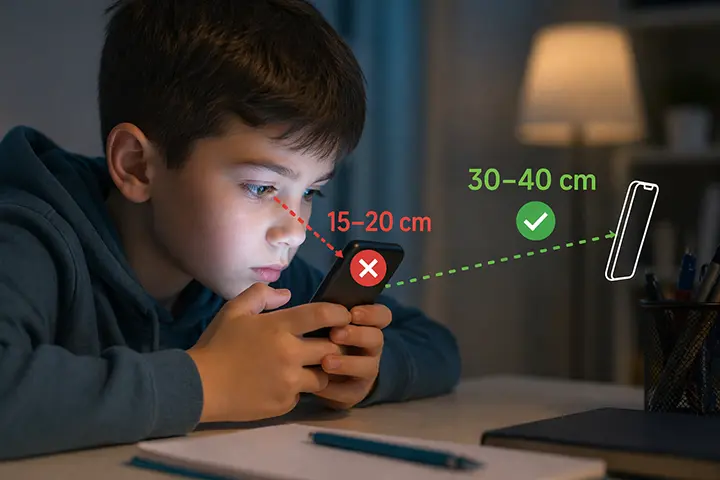
Most children hold their phones 15–20 cm from their face. Eye doctors recommend at least 30–40 cm. That gap is silently damaging their vision — and most parents have no idea it’s happening.
If you’ve ever watched your child scroll through YouTube or play a game with their phone practically touching their nose, you’re not imagining things. Children instinctively bring screens closer — it’s not defiance, it’s habit. But that habit has real consequences for developing eyes, and understanding the right screen distance for kids is one of the most practical things a parent can do to protect their child’s vision.
What Distance Do Eye Doctors Recommend for Kids?
The clinical consensus among ophthalmologists and optometrists is clear: smartphones should be held at least 30–40 cm (12–16 inches) from the eyes. For children, many specialists recommend erring toward the higher end of that range — around 35–40 cm — because their eyes are still developing and are more susceptible to the effects of sustained near-work.
For comparison, most kids naturally hold their phone at 15–20 cm when lying down, watching videos, or playing games. That’s roughly half the recommended distance.
The 35 cm mark has become a common reference point in digital eye health guidelines. It’s close enough to see a phone screen comfortably at normal text sizes, but far enough to significantly reduce the strain placed on the eye muscles during prolonged use.
Why Does Screen Distance Matter for Children’s Eyes?
The link between near-work and myopia
Myopia (nearsightedness) in children has reached epidemic proportions globally. Research published in the British Journal of Ophthalmology in 2024 found that approximately one in three children worldwide is already myopic, and projections suggest that figure will rise to over 740 million cases by 2050.
While genetics plays a role, researchers increasingly point to environmental factors — particularly sustained near-work at close distances — as the primary driver of this surge. The correlation is especially strong in children under 12, whose eyes are still physically growing and reshaping.
When a child holds a phone at 15 cm rather than 35 cm, their eye muscles work significantly harder to maintain focus. Over hours of daily use, this repeated strain doesn’t just cause headaches — it may influence how the eyeball elongates during development, which is the structural change that causes myopia.
Eye strain and digital fatigue
Even in the short term, holding a phone too close causes digital eye strain (also called computer vision syndrome). Symptoms include:
- Blurred vision after screen use
- Headaches, especially around the temples or forehead
- Eye redness or irritation
- Difficulty refocusing when looking away from the screen
- Tired or sore eyes by evening
These symptoms are common — studies estimate that digital eye strain affects around 65% of adults who regularly use smartphones. In children, the symptoms are often underreported simply because kids don’t always recognize or articulate visual discomfort.
Why Kids Hold Phones Too Close (And Why Telling Them to Stop Doesn’t Work)
Understanding why children instinctively bring screens closer helps explain why verbal reminders rarely stick.
Text size. When text is small — whether in a game, a message, or a video subtitle — the natural response is to bring the screen closer. The brain prioritizes readability over distance. Increasing font size on your child’s device is a simple fix that many parents overlook.
Lying down. When children use phones lying on their backs or sides, gravity naturally pulls the device closer to their face. The 15 cm habit almost always develops in this position.
No physical feedback. Unlike sitting too close to a television — where the discomfort becomes obvious — holding a phone too close doesn’t feel immediately uncomfortable. The damage is cumulative and invisible, which means there’s no natural correction mechanism.
Habit and distraction. When a child is absorbed in content, they stop monitoring their posture or phone position entirely. The brain is focused on the screen, not the distance to it.
This is why parent reminders, however well-intentioned, don’t produce lasting change. A child can agree to hold their phone further away and genuinely mean it — but within minutes of re-engaging with content, the phone drifts back to 15 cm.
The 20-20-20 Rule: Helpful, But Not Enough
You may have heard of the 20-20-20 rule: every 20 minutes, look at something 20 feet away for 20 seconds. This guideline, widely recommended by optometrists, helps reduce eye muscle fatigue by giving the focusing muscles a periodic break.
It’s useful advice. But it addresses one dimension of the problem — duration — while leaving the other untouched: distance.
A child can faithfully follow the 20-20-20 rule and still spend every one of those 20-minute intervals with their phone at 15 cm. The rule doesn’t monitor or correct how close the screen is during active use.
Real eye protection for children requires both managing break frequency and maintaining safe viewing distance throughout the session.
Screen Time vs. Screen Distance: What’s the Difference?
Many parents focus primarily on how long their child uses a phone. Screen time limits are valuable — but screen distance is a distinct and often overlooked variable.
Consider two children:
- Child A uses their phone for 2 hours at 35 cm
- Child B uses their phone for 1 hour at 15 cm
Child B’s eyes may be under significantly more strain despite the shorter session. Near-work strain is a function of both duration and distance. Managing one without the other leaves a substantial portion of the risk unaddressed.
Built-in tools like Google’s Digital Wellbeing and Family Link are excellent for managing screen time, app usage, and content filtering. But neither monitors or enforces safe viewing distance. That gap is worth closing, especially for younger children whose visual habits are still forming.
Practical Ways to Help Kids Maintain Safe Screen Distance
Set text size larger
Go to Settings → Display → Font size and increase it by one or two steps. Larger text removes the instinct to bring the phone closer to read. This is the single easiest intervention with the most immediate effect on screen distance habits.
Encourage phone use at a table
Sitting at a table naturally positions the phone further from the face than lying down. For video watching or gaming, a phone stand or tablet holder can enforce a consistent distance without any ongoing parental supervision.
Use the 20-20-20 rule as a foundation
Set a reminder or use an app to prompt breaks every 20 minutes. While this doesn’t address distance directly, it reduces cumulative fatigue and is well-supported by clinical guidance.
Monitor distance automatically
The most reliable approach is one that doesn’t depend on willpower, reminders, or your child’s self-awareness. Apps like iVisionGuard use the front camera to measure the distance between your child’s face and the screen in real time, and immediately alert them when they get too close. Because it runs in the background automatically, it works continuously — even when you’re not in the room.
Unlike screen time tools, iVisionGuard specifically addresses the distance problem: it monitors how close, not just how long. The app is free for Android, detects distance on the device without recording video, and has a separate child profile; with Plus, a parent PIN keeps children from turning it off.
At What Age Should Parents Start Thinking About Screen Distance?
There’s no hard lower age limit, but the concern becomes most acute between ages 6 and 14, when the eye is most actively developing and when myopia, if it develops, tends to progress most rapidly.
However, habits form early. A 5-year-old who develops the habit of holding a tablet at 20 cm is building a pattern that will carry into adolescence. Starting distance awareness early — even if myopia isn’t yet a concern — establishes healthier defaults before they calcify.
For teenagers, who often have more phone independence, the challenge is different: there’s less parental oversight, more screen use in private (especially at night, lying down), and the habit is more entrenched. Automated monitoring becomes more valuable precisely because direct parental supervision is less feasible.
Key Takeaways
- Eye doctors recommend children hold phones at least 30–40 cm from their eyes
- Most children naturally hold phones at 15–20 cm — roughly half the safe distance
- Prolonged close-distance screen use is linked to accelerated myopia development in children
- Verbal reminders don’t produce lasting change because kids lose awareness of distance when engaged with content
- The most reliable protection combines screen time management with automatic distance monitoring
- Practical steps include increasing font size, encouraging table-based use, and using apps that monitor distance in real time
Frequently Asked Questions
How far should a child hold their phone from their eyes? The recommended distance is 30–40 cm (approximately 12–16 inches). For younger children with developing eyes, staying toward the upper end of that range — around 35–40 cm — is advisable.
Can holding a phone too close cause permanent eye damage? Research links sustained near-work at close distances to accelerated myopia progression in children. While the relationship is correlational rather than directly causal, the evidence is strong enough that major ophthalmology bodies consider screen distance a meaningful risk factor for childhood myopia.
Is there an app that monitors screen distance for kids? Yes. iVisionGuard is a free Android app that uses the front camera to measure real-time distance and alerts children when they hold the phone too close. It runs in the background, requires no ongoing interaction, and with Plus offers PIN-protected settings. It does not record video.
Why won’t my child stop holding their phone so close? It’s primarily a habit and distraction issue, not defiance. When absorbed in content, children stop monitoring their own position. The most effective solutions are structural — larger text sizes, phone stands, and automatic distance monitoring — rather than repeated verbal reminders.
References
- Foreman J, Salim AT, Praveen A, et al. Association between digital smart device use and myopia: a systematic review and meta-analysis. The Lancet Digital Health. 2021;3(12):e806–e818.
- Xiong S, Sankaridurg P, Naduvilath T, et al. Time spent in outdoor activities in relation to myopia prevention and control: a meta-analysis and systematic review. Acta Ophthalmologica. 2017;95(6):551–566.
- American Optometric Association. Computer Vision Syndrome.
- National Eye Institute. Nearsightedness (Myopia).
Related reading
- Screen Distance on Android — how to get the same distance alerts on an Android phone
- Screen Distance for Adults — the same question, answered for grown-ups
- Best Screen Habits for Kids Under 12 — what to set up beyond distance
iVisionGuard is a free eye protection app for Android that monitors screen-to-face distance in real time. Learn more at ivisionguard.com or download on Google Play.