Digital Eye Strain Symptoms and How to Prevent Them
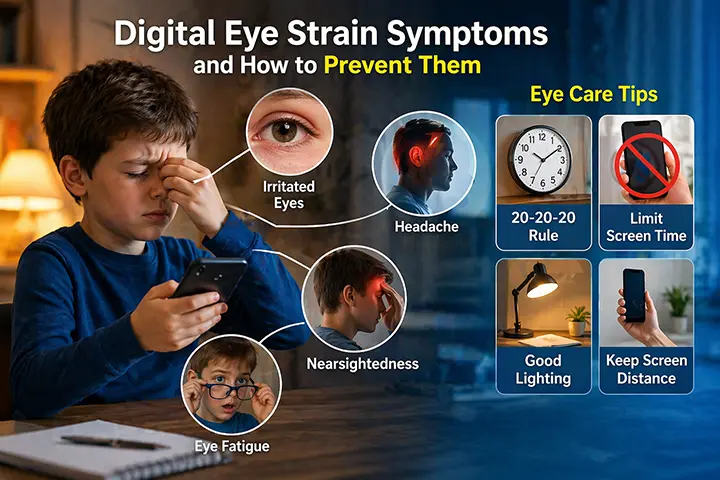
Your eyes weren’t designed for screens. After hours of scrolling, reading, and watching, they’ll tell you — if you know what to listen for.
Digital eye strain is now one of the most common complaints among smartphone and computer users worldwide. Studies estimate it affects around 65% of adults who regularly use screens, yet most people either don’t recognise the symptoms or assume the discomfort is normal and unavoidable.
It isn’t. Most cases of digital eye strain are preventable — not by using screens less, but by using them differently.
What Is Digital Eye Strain?
Digital eye strain — also called computer vision syndrome (CVS) — is a group of eye and vision-related symptoms caused by prolonged use of digital screens. It can result from extended use of smartphones, tablets, computers, or any screen that requires sustained visual focus at close range.
Unlike many eye conditions, digital eye strain is not structural damage. It’s functional fatigue — the visual system under more sustained stress than it was designed to handle. This also means it’s largely reversible and, with the right habits, largely preventable.
The American Optometric Association recognises computer vision syndrome as a significant occupational and lifestyle health concern, particularly as average daily screen time continues to rise across all age groups.
Digital Eye Strain Symptoms: What to Look For
Symptoms typically develop during extended screen use or shortly after, and may persist for several hours. They often go unnoticed because they build gradually rather than appearing suddenly.
Eye fatigue and soreness
The most common symptom. After sustained screen use, the muscles responsible for focusing — the ciliary muscles — become fatigued from holding the same focal distance for extended periods. This produces a dull ache behind the eyes or a heavy, tired sensation that makes continued focus uncomfortable.
Blurred vision
Temporary blurring during or after screen use is a classic sign of digital eye strain. It occurs for two reasons: ciliary muscle fatigue makes it harder to maintain sharp focus, and reduced blinking during screen use leads to uneven tear film distribution across the cornea, which degrades optical clarity.
Headaches
Screen-related headaches typically present around the temples, forehead, or behind the eyes. They’re caused by sustained contraction of the eye muscles during focus, compounded by poor posture, screen glare, and uncorrected refractive errors that force the visual system to work harder than usual.
Dry and irritated eyes
When people look at screens, their blink rate drops significantly — from a normal rate of around 15–20 blinks per minute to as few as 5–7. Blinking is what spreads the tear film that keeps the eye’s surface lubricated. Less blinking means faster evaporation of the tear film, leading to dryness, burning, grittiness, or a feeling that something is in the eye.
Neck and shoulder pain
Digital eye strain frequently co-occurs with musculoskeletal discomfort. When vision is strained, people instinctively lean forward or tilt their head to see more clearly. Over time this produces tension in the neck, shoulders, and upper back. The visual and physical symptoms are connected — addressing one often reduces the other.
Difficulty refocusing
After extended close-screen use, many people find it temporarily difficult to shift focus to objects further away. This lag — called accommodative spasm — reflects the ciliary muscles’ reluctance to relax after prolonged near-work. It typically resolves within minutes but can persist for longer with habitual close-distance screen use.
Light sensitivity
Prolonged exposure to screen light, particularly blue-spectrum light emitted by LED displays, can temporarily increase sensitivity to bright light. This is most noticeable in the hours after a long screen session and is often accompanied by a general feeling of visual fatigue.
What Causes Digital Eye Strain?
Several factors contribute, and most people experience a combination rather than a single cause.
Prolonged near-focus
The eye’s focusing system — the lens and ciliary muscles — was optimised for a world where most objects of interest were at varying distances. Sustained focus at a fixed close distance (a screen) keeps the ciliary muscles in a state of constant contraction, leading to fatigue that accumulates over hours of use.
Screen distance that’s too close
This is one of the most underappreciated causes of digital eye strain, and the one most consistently overlooked. Eye doctors recommend holding smartphones at 30–40 cm from the eyes. The average user holds their phone at 18–25 cm — roughly half to two-thirds of the recommended distance.
At closer distances, the eye’s focusing muscles work proportionally harder. A phone at 20 cm requires significantly more accommodative effort than the same phone at 35 cm. Over hours of daily use, this difference in muscle load is substantial.
This is also why children are particularly vulnerable: they tend to hold screens even closer than adults, and their eyes are still developing, making them more susceptible to the cumulative effects of near-work strain.
Reduced blink rate
As noted above, screen use dramatically reduces how often we blink. This is partly attentional — focus suppresses reflexive blinking — and partly positional: looking slightly upward at a screen (as people often do at a desktop) exposes more of the eye’s surface, increasing evaporation even between blinks.
Screen glare and reflections
Glare from overhead lighting or windows reflecting off screens forces the visual system to work harder to resolve contrast. Matte screen protectors, anti-glare filters, and repositioning screens relative to light sources all help.
Uncorrected or undercorrected vision
People with mild refractive errors — slight nearsightedness, farsightedness, or astigmatism — who don’t wear correction, or who use an outdated prescription, place extra strain on the visual system during screen use. Regular eye exams are particularly important for heavy screen users.
Blue light exposure
The role of blue light in digital eye strain is more nuanced than popular coverage suggests. Current evidence does not support the idea that blue light causes structural eye damage at the levels emitted by screens. However, blue light — particularly in the evening — does suppress melatonin production and disrupt circadian rhythms, which affects sleep quality and contributes to fatigue that worsens visual symptoms the following day.
How to Prevent Digital Eye Strain
Prevention doesn’t require using screens less. It requires using them more intelligently.
Follow the 20-20-20 rule
The most widely recommended guideline for screen users: every 20 minutes, look at something at least 20 feet (6 metres) away for at least 20 seconds.
This gives the ciliary muscles a genuine break from near-focus, allowing them to relax before the next sustained session. Setting a recurring timer — or using an app that reminds you — makes this automatic rather than reliant on self-monitoring.
The 20-20-20 rule addresses duration of near-focus. It doesn’t address screen distance, but it’s a useful and well-supported foundation.
Maintain safe screen distance
Hold your smartphone at 30–40 cm from your eyes. For computers, the monitor should be roughly 50–70 cm away — approximately arm’s length. If you find yourself drifting closer to read, increase the font size rather than reducing the distance.
This is easier said than done. Distance is the first thing that drifts during absorbed screen use — particularly lying down, where gravity pulls the phone closer. Increasing font size on your device is the single most effective structural change, because it removes the reason to bring the screen closer.
For parents concerned about children’s screen distance, automated monitoring is the most reliable solution: an app that watches the distance continuously and alerts immediately when it’s violated, without requiring willpower or self-awareness from the child.
iVisionGuard does exactly this for Android — using the front camera to measure real-time face-to-screen distance and triggering an instant alert when the phone is held too close. It runs in the background across all apps, works fully offline, and never records or stores any video data.
Blink consciously and use artificial tears
Remind yourself to blink fully and regularly during screen use. If you’re in a dry environment or use screens for extended periods, preservative-free artificial tears can replenish the tear film and significantly reduce dryness and irritation.
Optimise your environment
- Reduce glare: Position screens perpendicular to windows rather than facing them. Use matte screen protectors if reflections are a persistent issue.
- Match screen brightness to ambient light: A screen that’s significantly brighter or darker than the surrounding environment increases contrast strain. Most modern devices handle this automatically with auto-brightness, but it’s worth verifying.
- Use night mode in the evening: Reducing blue light output in the hours before bed doesn’t prevent eye strain directly, but it supports better sleep — which significantly affects how fatigued your eyes feel the next day.
Get regular eye exams
Adults who use screens heavily should have their eyes examined at least every two years — annually if symptoms are frequent or worsening. Many people develop mild refractive errors in their 20s and 30s that go uncorrected because the symptoms are attributed to screen fatigue rather than underlying vision changes.
For children, annual exams are recommended, particularly if they use screens regularly or show signs of squinting, sitting too close to the TV, or holding books and phones very close to their face.
Consider computer glasses
For people who spend significant portions of their workday at a screen, prescription lenses optimised for intermediate viewing distance (50–70 cm) can substantially reduce eye muscle effort compared to using distance correction or reading glasses. Discuss this option with an optometrist if you experience persistent symptoms despite other adjustments.
Digital Eye Strain in Children: A Separate Concern
Children experience digital eye strain for the same reasons adults do — but with additional long-term implications that make prevention more urgent.
In children, the visual system is still developing. Sustained near-work at close distances doesn’t just cause temporary fatigue — research increasingly links it to myopia progression. The eye responds to prolonged close-focus demands by elongating, which is the structural change that causes nearsightedness. Once present, myopia typically worsens through childhood and early adulthood.
A comprehensive analysis published in the British Journal of Ophthalmology projects that myopia will affect over 740 million children worldwide by 2050, up from an estimated one in three today. Researchers identify reduced outdoor time and increased close-range screen use as the primary environmental drivers.
For parents, the implication is that managing children’s screen distance is not just about comfort — it’s about long-term vision development. Digital eye strain symptoms in a child (rubbing eyes, complaints of headaches, squinting, sitting very close to screens) should be taken seriously and followed up with an eye examination.
When to See an Eye Doctor
Most digital eye strain resolves with rest and habit changes. However, see an optometrist or ophthalmologist if:
- Symptoms persist for more than a few days despite reducing screen time
- You experience sudden changes in vision, such as new floaters, flashes of light, or significant blurring
- Headaches are severe or don’t improve with over-the-counter pain relief
- Your child consistently complains of eye discomfort, headaches, or difficulty seeing the board at school
- You haven’t had an eye exam in more than two years and use screens heavily
Key Takeaways
- Digital eye strain affects an estimated 65% of regular screen users and produces symptoms including eye fatigue, headaches, dry eyes, blurred vision, and neck pain
- The primary causes are prolonged near-focus, screens held too close, reduced blinking, glare, and uncorrected vision
- Eye doctors recommend holding smartphones at 30–40 cm; most people hold them at 18–25 cm
- The 20-20-20 rule, safe screen distance, conscious blinking, and environmental adjustments prevent most cases
- In children, close-distance screen use is linked to myopia progression — making distance monitoring particularly important for developing eyes
- Automated tools like iVisionGuard remove the reliance on willpower by monitoring screen distance in real time and alerting users when they hold their phone too close
Frequently Asked Questions
What are the main symptoms of digital eye strain? The most common symptoms are eye fatigue and soreness, headaches, blurred vision, dry or irritated eyes, neck and shoulder tension, difficulty refocusing on distant objects, and temporary light sensitivity. Symptoms typically develop during or after extended screen sessions.
How do I get rid of digital eye strain fast? Take a break from screens and look at a distant object for at least 20 seconds to allow the focusing muscles to relax. Use artificial tears if your eyes feel dry. Dim overhead lighting if glare is a factor. Most acute symptoms resolve within 30–60 minutes of stopping screen use.
Does screen distance affect eye strain? Yes — significantly. Holding a phone at 20 cm requires the eye muscles to work roughly twice as hard as holding it at 35–40 cm. Screen distance is one of the most impactful variables in digital eye strain, and one of the most commonly overlooked.
Is digital eye strain permanent? In adults, digital eye strain does not cause permanent structural damage to the eyes. Symptoms are functional and reversible with rest and habit changes. In children, however, sustained near-work at close distances is associated with myopia development, which is a permanent structural change.
Can an app help prevent digital eye strain? Apps can help by automating the habits that prevent strain. iVisionGuard monitors screen-to-face distance in real time on Android and alerts users when they hold their phone too close — addressing one of the primary causes of eye strain automatically, without requiring self-monitoring.
Related reading
- Screen Distance for Adults — the distance that causes most of the strain
- The 20-20-20 Rule — what the evidence actually shows
- Reduce Eye Strain When Working From Home — desk setup that helps
iVisionGuard is a free Android app that monitors screen distance in real time and alerts you when your phone is too close — helping prevent digital eye strain automatically. Download free on Google Play or learn more at ivisionguard.com.