Best Screen Habits for Kids Under 12: A Parent’s Practical Guide
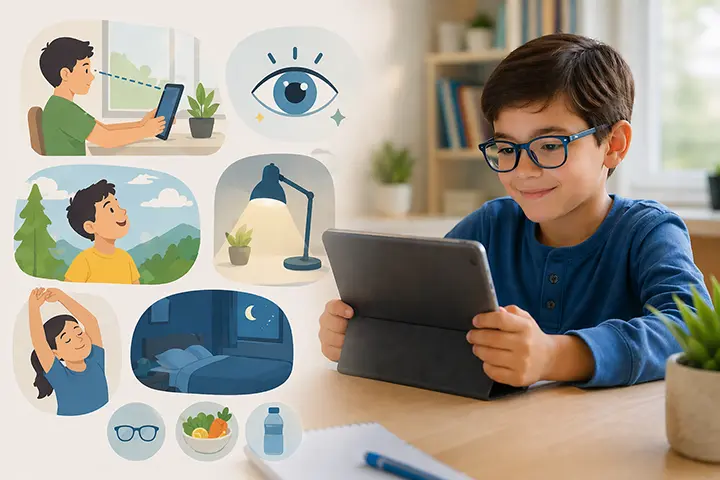
Children under 12 are using screens more than ever — and their eyes are paying the price. The good news: the habits that protect their vision are simpler than most parents expect.
If you have a child under 12, you’ve probably already thought about screen time. Maybe you’ve set limits, had arguments about phones at dinner, or wondered whether the two hours your child just spent on YouTube is doing something you can’t see.
The research is clear that it is. But it’s also clear that the solution isn’t simply “less screen time” — it’s smarter screen habits. Children who develop healthy screen routines early are significantly better protected against digital eye strain, myopia progression, and the behavioural patterns that make screen use harder to manage as they get older.
This guide covers what the evidence actually says — and what to do about it.
Why Under 12 Is the Critical Window
The years between ages 3 and 12 are when the visual system is most actively developing. The eye itself is still physically growing — the eyeball is elongating to reach its adult shape — and this process is influenced by the visual environment the child spends time in.
Two things are happening simultaneously during this period that make screen habits particularly consequential:
The eye is learning to focus. The lens and ciliary muscles are developing their range and precision. Sustained close-range focus during this period — especially at distances closer than recommended — places repeated strain on a system that is still maturing.
Myopia risk is at its highest. Research consistently shows that the onset of myopia most commonly occurs between ages 7 and 12. Children who develop myopia during this window typically experience progression — worsening nearsightedness — through their mid-teens. Early habits that reduce near-work strain and increase outdoor time can meaningfully affect whether and how quickly this progression occurs.
After 12, the visual system is largely set. Habits still matter — digital eye strain affects adults too — but the window for influencing the structural development of the eye is narrowing. This is why the under-12 years matter most.
Screen Time Recommendations by Age: What the Guidelines Say
The major paediatric and public health organisations offer the following guidelines:
Under 18–24 months: No screen use except video calls. The visual and cognitive systems at this age are not ready for passive screen content, and there is no developmental benefit.
Ages 2–5: Maximum one hour per day of high-quality content, watched with a parent who can contextualise what the child sees. Passive consumption (YouTube autoplay, background TV) is more problematic than interactive or co-viewed content.
Ages 6–12: No single universal limit — recommendations vary — but the American Academy of Pediatrics (AAP) emphasises consistent limits, no screens during meals or in the hour before bed, and ensuring screen time doesn’t displace sleep, physical activity, or face-to-face interaction.
These guidelines focus primarily on duration and content. They say less about a variable that matters just as much for eye health: screen distance. A child following the one-hour limit for ages 2–5 but holding their tablet 15 cm from their face throughout is still placing significant strain on developing eyes. Time limits and distance management are separate protections — both matter.
The 7 Best Screen Habits for Kids Under 12
1. Enforce the 30–40 cm rule — but make it structural
Eye doctors recommend holding smartphones and tablets at least 30–40 cm from the eyes. Most children hold them at 15–20 cm, particularly when lying down or absorbed in content.
Verbal reminders work short-term but don’t produce lasting change — a child re-engaged with a game will drift back to 15 cm within minutes. Structural changes are more durable:
- Increase font size by two steps on your child’s device (Settings → Display → Font size). Larger text removes the instinct to bring the screen closer.
- Use a tablet stand or phone holder for video watching. A stand enforces a fixed distance without ongoing supervision.
- No screens lying down. The supine position is where most close-distance use happens. A simple rule — screens only when sitting up — makes a meaningful difference.
- Use an automatic distance monitor. Apps like iVisionGuard use the front camera to measure real-time face-to-screen distance and alert immediately when your child holds the phone too close. Because it runs in the background across all apps and can be PIN-locked so children can’t disable it, it works even during unsupervised use.
2. Build in mandatory outdoor time every day
This is the single most evidence-backed intervention for childhood myopia prevention — and the one most consistently overlooked in conversations about screen habits.
Exposure to natural light triggers dopamine release in the retina, which research suggests inhibits the excessive eye elongation associated with myopia development. Multiple studies have found that children who spend at least two hours outdoors daily have significantly lower rates of myopia onset compared to those who spend most of their time indoors — regardless of how much near-work they do.
The mechanism is still being studied, but the correlation is robust enough that paediatric ophthalmologists now routinely recommend outdoor time as a specific myopia prevention measure, not just general health advice.
For parents managing screen time, this reframes the calculation: the question isn’t only “how much screen time?” but “is my child getting enough outdoor time to counterbalance it?”
3. No screens in the hour before bed
Blue light from screens suppresses melatonin production — the hormone that regulates the sleep-wake cycle. In children, whose circadian rhythms are more sensitive than adults’, even 30–60 minutes of evening screen use can delay sleep onset by 30–45 minutes and reduce sleep quality.
Poor sleep in children has downstream effects on concentration, mood, and behaviour the following day. It also means children are more fatigued going into the next school day — which affects everything including how they hold their phone (tired children tend to bring screens closer as focus effort increases).
A consistent no-screens rule in the hour before bed is one of the simplest and highest-impact habits a parent can establish. Google Family Link and Samsung parental controls both allow bedtime device locks that enforce this automatically.
4. Observe the 20-20-20 rule during sessions
Every 20 minutes of screen use, look at something at least 20 feet (6 metres) away for 20 seconds. This gives the ciliary muscles a genuine break from sustained near-focus.
For younger children (under 8), sessions shouldn’t run long enough to need this rule — 20-minute maximum sessions with natural breaks are more appropriate than teaching a recovery technique. For older children (8–12) who are using screens for homework or longer sessions, introducing the 20-20-20 rule as an explicit habit builds awareness that will serve them through adolescence.
A simple recurring timer — or a visual reminder on the screen — works better than relying on the child to self-monitor.
5. Keep screens out of the bedroom entirely
This addresses multiple problems at once: it removes the temptation for late-night use, eliminates the lying-down close-distance habit, and creates a clear physical boundary between screen time and downtime.
For children under 12, this is one of the most straightforward and effective structural interventions available. Devices charge overnight in a common area, not the child’s room. This removes the need for willpower entirely.
6. Match screen brightness to the environment
A screen that’s significantly brighter than its surroundings forces the eyes to work harder to manage contrast. Most modern devices have auto-brightness enabled by default — verify that it’s on. In dim rooms, reduce screen brightness manually.
For evening use (within the recommended limits), night mode or warm display settings reduce blue light output and are easy to enable on any Android device through Quick Settings.
7. Make the first device interaction of the day non-screen
Children who reach for their phone or tablet as the first thing they do after waking are building a habit loop that makes screen limits harder to enforce as they get older. A simple alternative — breakfast first, outdoor time first, or a physical activity first — establishes the cognitive pattern that screens are one option among several, not the default.
This isn’t about restricting screen time; it’s about the structure around it.
The Role of Parental Controls in Building Screen Habits
Habits work best when they don’t rely on willpower. For children under 12, the most durable screen habits are those enforced structurally — through device settings and tools — rather than through repeated conversations.
Google Family Link manages screen time limits, app access, and bedtime locks. It’s the foundation of supervised Android use for children.
Digital Wellbeing on Android provides usage dashboards, app timers, and Focus Mode. Better suited to older children who benefit from seeing their own usage data.
iVisionGuard addresses the dimension that neither of these tools covers: screen distance. Running in the background across all apps, it monitors the real-time distance between your child’s face and the screen and alerts them — visually and with sound — when they hold it too close. The Plus version adds PIN-protected settings so children can’t disable it. It’s free, works offline, detects distance on the device, and never records video.
These tools work together rather than competing. Screen time management (Family Link) plus screen distance monitoring (iVisionGuard) plus environmental defaults (bedroom charging, font size, stands) gives you coverage across the variables that matter most.
Signs Your Child May Already Have Eye Strain or Vision Problems
Watch for these indicators, particularly in children who use screens regularly:
- Squinting or tilting the head when looking at screens or the board at school
- Sitting very close to the television
- Frequent complaints of headaches, especially after school or screen use
- Rubbing eyes often during or after screen sessions
- Complaints that things look blurry
- Avoiding reading or close work
- Losing their place while reading, or using a finger to track text
Any of these warrants a conversation with your paediatrician and, if symptoms persist, a full eye examination with a paediatric optometrist or ophthalmologist. Many children don’t complain about vision problems because they have no reference point for how things should look — they assume everyone sees the way they do.
Summary: The Complete Checklist
A practical reference for parents:
Distance: Phone and tablet at 30–40 cm. Use stands, increase font size, no lying down.
Time: Follow AAP guidelines by age. No screens under 18 months. One hour maximum for ages 2–5.
Breaks: 20-20-20 rule for sessions over 20 minutes. Natural breaks for younger children.
Outdoors: Two hours of outdoor time daily, in natural light.
Evening: No screens in the hour before bed. Device charges outside the bedroom.
Monitoring: Use Family Link for time limits and iVisionGuard for distance monitoring.
Eye exams: Annually for children who use screens regularly or show any symptoms.
Frequently Asked Questions
What is the recommended screen time for kids under 12? The American Academy of Pediatrics recommends no screen time for children under 18–24 months (except video calls), one hour maximum per day for ages 2–5, and consistent limits for ages 6–12 that don’t displace sleep, physical activity, or social interaction. Duration is one variable; screen distance and content quality matter equally.
How does outdoor time help prevent myopia in children? Exposure to natural light stimulates retinal dopamine release, which research suggests inhibits the excessive eye elongation associated with myopia development. Paediatric ophthalmologists recommend at least two hours of outdoor time daily as a specific myopia prevention measure.
What is the best screen distance for children? Eye doctors recommend 30–40 cm for smartphones and tablets. For computers, 50–70 cm is advised. Most children naturally hold devices at 15–20 cm — structural interventions like phone stands, larger font sizes, and distance monitoring apps are more effective than verbal reminders.
Can screen habits reverse myopia in children? No. Once myopia has developed, it cannot be reversed through habit changes alone. However, evidence supports that healthy screen habits — particularly maintaining safe viewing distance and spending time outdoors — can slow the rate of myopia progression in children.
Is there an app that helps enforce screen distance for kids? Yes. iVisionGuard is a free Android app that monitors screen-to-face distance in real time and alerts children when they hold the phone too close. The Plus version includes PIN-protected settings that prevent children from disabling alerts without a parent’s permission.
Related reading
- How Far Should Kids Hold Their Phone? — the number behind the habit
- Screen Distance on Android — how to make the phone remind them for you
- When Should Kids Have Their First Eye Exam? — the schedule by age
iVisionGuard is a free Android app that monitors screen distance in real time — helping protect children’s developing eyes automatically. Download free on Google Play or learn more at ivisionguard.com.