Android Parental Controls for Eye Health: What’s Missing
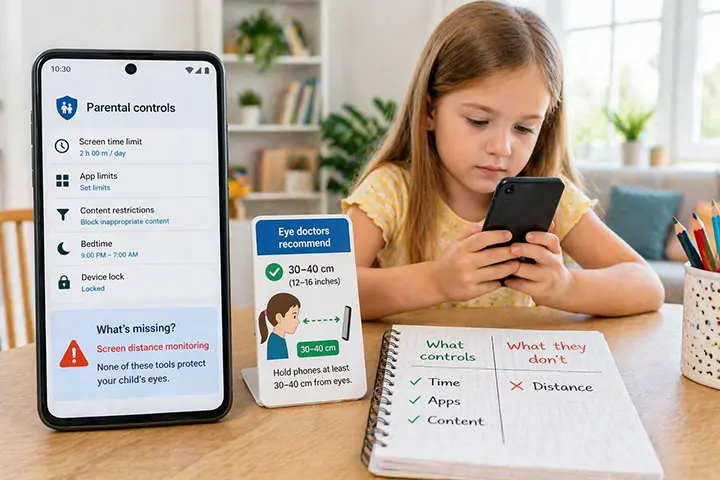
Android has powerful tools for managing what your child does on their phone. But there’s one critical gap that none of them address — and it’s quietly affecting your child’s vision every day.
If you’ve spent time setting up Google Family Link, Digital Wellbeing, or a third-party parental control app, you’ve done more than most parents. These tools are genuinely useful: they limit screen time, filter content, track app usage, and let you lock the device remotely. For a parent trying to manage a child’s relationship with technology, they cover a lot of ground.
But there’s one thing none of them do.
Not one of Android’s built-in parental controls — and none of the major third-party apps — monitors or enforces the physical distance between your child’s face and the screen.
That gap matters more than most parents realise.
What Android Parental Controls Actually Do
Before looking at what’s missing, it’s worth being clear about what Android’s tools do well.
Google Family Link
Family Link is Google’s primary parental control platform for Android. Connected to your child’s Google account, it allows parents to:
- Set daily screen time limits and app timers
- Approve or block app downloads from Google Play
- See which apps your child uses and for how long
- Lock the device remotely at any time
- Set a bedtime after which the device is locked
Family Link is free, well-maintained, and works across Android devices. For parents who want oversight of content and usage time, it’s a solid foundation.
Digital Wellbeing
Digital Wellbeing is built into Android itself and available on the child’s device directly. Its tools include:
- A dashboard showing daily screen time broken down by app
- App timers that grey out an app when the limit is reached
- Focus Mode, which pauses distracting apps on demand
- Bedtime Mode, which dims the screen and silences notifications at night
- Wind Down, which gradually reduces screen brightness before bed
Digital Wellbeing is primarily a self-regulation tool — it works best when the user (your child) is motivated to use it. For younger children, it offers less enforcement and more awareness.
Samsung Kids and Samsung Digital Wellbeing
Samsung devices include additional parental tools through Samsung Kids (a restricted environment for young children) and their own Digital Wellbeing layer. These offer content curation, usage reporting, and contact restrictions — useful additions on Samsung hardware, but still focused on time and content rather than anything physical.
Third-party parental control apps
Apps like Qustodio, Bark, and Kaspersky Safe Kids extend these capabilities further — adding web filtering, social media monitoring, location tracking, and detailed usage reports. They’re more comprehensive than Google’s built-in tools and better suited to older children with more independence.
What they all have in common: they measure and manage how long and what your child sees. None of them address how close.
The Gap: Screen Distance Is Not Monitored by Any of These Tools
Here’s what happens in practice. You set a two-hour daily limit on your child’s phone through Family Link. Your child uses those two hours lying on their back, phone held 15 cm from their face, watching YouTube.
Family Link sees: two hours of screen time. Limit reached. Device locked.
What Family Link doesn’t see: two hours of sustained near-work at half the clinically recommended viewing distance, placing significant strain on developing eye muscles and contributing to the risk factors associated with childhood myopia progression.
The tool did exactly what it was designed to do. It just wasn’t designed to do this.
Why screen distance matters for children’s eyes
Eye doctors recommend holding smartphones at least 30–40 cm from the eyes. Most children naturally hold their phone at 15–20 cm — particularly when lying down, which is when a large proportion of children’s phone use occurs.
Research published in the British Journal of Ophthalmology found that approximately one in three children worldwide is already myopic, with projections suggesting over 740 million cases by 2050. While multiple factors contribute to myopia development, sustained near-work at close distances is consistently identified as a significant environmental risk factor — especially in children under 12 whose eyes are still developing.
Screen time limits help by reducing total exposure. But a child who holds their phone at 15 cm for one hour may be placing more strain on their eyes than a child who holds it at 35 cm for two hours. Duration and distance are separate variables, and current parental control tools only address one of them. Android has no built-in screen-distance warning either, the way recent iPhones do — for what Apple’s Screen Distance offers and how to get the equivalent on Android, see Screen Distance on Android.
Why Android Doesn’t Have a Built-in Screen Distance Feature
Apple addressed this gap in 2023 with the introduction of Screen Distance in iOS 17. The feature uses the iPhone’s TrueDepth camera system to detect when the device is held closer than 30 cm, and displays a full-screen warning that must be dismissed by moving the phone further away. It’s available for both adults and children, and can be enabled through Screen Time settings.
Android has no equivalent feature. This is partly a technical constraint — reliably measuring face-to-screen distance requires consistent front camera access in the background, which Android’s permission architecture handles differently across devices and manufacturers. But it’s also simply a gap that Google hasn’t prioritised. Digital Wellbeing has expanded steadily since its introduction in 2018, but screen distance monitoring has not appeared in any Android release to date.
For the roughly 3.9 billion Android users worldwide — the large majority of the global smartphone market — this means the gap remains open.
What Actually Fills the Gap
Since Android’s built-in tools don’t address screen distance, the practical options for parents are limited but real.
Structural habits
The most reliable non-technical interventions involve changing the physical context of phone use:
- Increase font size on your child’s device. Larger text removes the instinct to bring the screen closer to read. Go to Settings → Display → Font size and increase by one or two steps.
- Encourage table-based use. Sitting at a table naturally positions the phone further from the face than lying down. A phone stand or tablet holder reinforces this without requiring ongoing supervision.
- Avoid phone use lying down. The supine position is where most close-distance use happens. Establishing a simple rule — phone use only when sitting up — makes a meaningful difference.
These habits work, but they depend on consistent enforcement and your child’s cooperation. They don’t scale to unsupervised use, which becomes increasingly common as children get older.
Automatic distance monitoring
The most direct solution is an app that monitors screen distance continuously and alerts your child in real time — working in the background regardless of which app they’re using, without requiring any action from you or your child during normal use.
iVisionGuard is a free Android app that does exactly this. It uses the front camera to measure the distance between your child’s face and the screen in real time, and triggers an immediate visual and sound alert when the phone is held too close. The default threshold is 35 cm — the midpoint of the clinically recommended range — and you can set anything from 20 to 80 cm.
Because it runs in the background, it works during YouTube, games, messaging, or any other app — not just when a specific app is open. Because distance is detected on the phone and no video is ever recorded, the camera works as a sensor rather than a recorder.
The Plus version adds PIN and biometric-locked settings, so children can’t disable or adjust the alerts without a parent’s authorisation — addressing the practical challenge of enforcing any tool with an older child.
How iVisionGuard complements Family Link and Digital Wellbeing
These tools aren’t alternatives — they address different dimensions of the same problem.
Family Link and Digital Wellbeing manage screen time and content. iVisionGuard manages screen distance. Used together, they cover both variables: how long your child uses their phone, and how close they hold it while they do.
Think of it as the difference between managing how many hours your child spends sitting at a desk, and managing whether they’re sitting with good posture while they’re there. One without the other leaves something important unaddressed.
Setting Up Complete Eye Protection on Android
A practical setup for parents who want to address both screen time and screen distance:
Step 1 — Screen time and content (Google Family Link): Set daily limits, app restrictions, and a bedtime lock. This manages total exposure and ensures your child isn’t using their phone at times they shouldn’t be.
Step 2 — Screen distance (iVisionGuard): Install iVisionGuard, switch to the child profile, and use the Plus PIN lock to prevent your child from disabling alerts. Set the threshold to 35 cm or higher for younger children.
Step 3 — Physical defaults: Increase font size by one or two steps. Consider a phone stand for video watching. Establish a norm around sitting up during phone use.
This combination addresses what no single tool currently covers on Android: the full picture of healthy smartphone use for children.
Key Takeaways
- Android’s parental control tools — Family Link, Digital Wellbeing, third-party apps — manage screen time and content effectively, but none monitor screen distance
- Apple added Screen Distance to iOS 17 in 2023; Android has no equivalent built-in feature
- Children typically hold phones at 15–20 cm; eye doctors recommend 30–40 cm; this gap is a significant risk factor for myopia progression
- Structural habits (larger font, table use) help but don’t scale to unsupervised use
- iVisionGuard fills the gap with real-time background distance monitoring — free, offline, and designed to work alongside Family Link and Digital Wellbeing
Frequently Asked Questions
Does Google Family Link monitor screen distance? No. Family Link manages screen time limits, app usage, content filtering, and device locking. It does not monitor the physical distance between the child’s face and the screen.
Does Android have a screen distance feature like iPhone? No. Apple introduced Screen Distance in iOS 17 (2023). As of 2025, Android has no equivalent built-in feature. Third-party apps like iVisionGuard fill this gap on Android devices.
What is the best parental control app for eye health on Android? For complete eye health management, use Family Link for screen time alongside iVisionGuard for screen distance monitoring. iVisionGuard is the only Android app that monitors real-time face-to-screen distance in the background and alerts children when they hold their phone too close.
Can my child disable iVisionGuard? The free version can be adjusted through the app settings. The Plus version adds PIN and biometric protection, preventing children from changing settings or disabling alerts without a parent’s authorisation.
iVisionGuard is a free Android app that monitors screen-to-face distance in real time — filling the gap that Android’s built-in parental controls don’t address. Download free on Google Play or learn more at ivisionguard.com.